

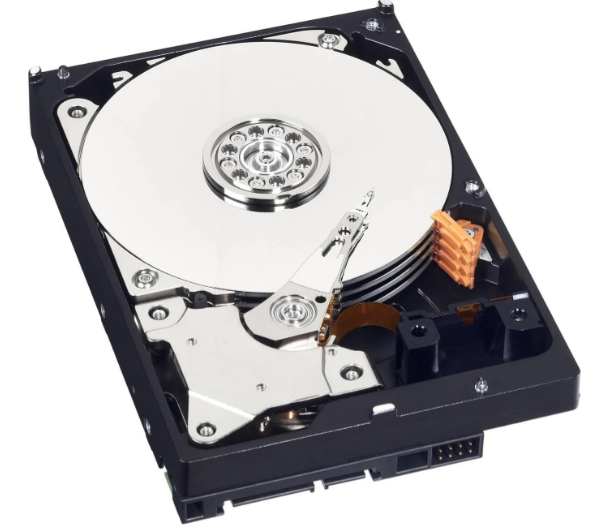
When upgrading or building a computer, choosing the right storage device is an important decision. The two most common storage options are SSD (Solid State Drive) and HDD (Hard Disk Drive). Both are used to store operating systems, applications, documents, photos, videos, and other files, but they differ significantly in speed, performance, durability, capacity, and price.
In this SSD vs HDD guide, we will explain the major differences between these two storage technologies and help you decide which one is better for your computer.
SSD vs HDD: What Is the Difference?
The main difference between an SSD and an HDD is how they store data.
An SSD uses flash memory to store data and has no moving mechanical parts. This allows an SSD to read and write data much faster.
An HDD, on the other hand, uses spinning magnetic disks and a mechanical read/write head to store and access data. Because of its mechanical design, an HDD is generally slower than an SSD.
Simply put, if you want better speed and responsiveness, an SSD is usually the better choice. If you need a large amount of storage at a lower cost, an HDD can still be a useful option
What Is an SSD?
An SSD, or Solid State Drive, is a modern storage device that uses NAND flash memory. Unlike traditional hard drives, SSDs do not contain spinning disks or mechanical components.
This design provides several advantages, including:
- Faster boot times
- Faster application loading
- Quicker file transfers
- Better overall system responsiveness
- Silent operation
- Lower power consumption
- Better resistance to physical shocks
SSDs are available in different form factors and interfaces, including SATA SSDs and faster NVMe SSDs.
For users who want a faster computer experience, upgrading from an HDD to an SSD can make a noticeable difference.
What Is an HDD?
An HDD, or Hard Disk Drive, is a traditional storage device that has been used in computers for many years. It stores data on rotating magnetic platters and uses a mechanical head to read and write information.
The biggest advantage of HDDs is their ability to provide large storage capacities at relatively affordable prices.
HDDs are commonly used for:
- Large media collections
- Photos and videos
- Backups
- Documents and archives
- General-purpose bulk storage
Although HDDs are slower than SSDs, they can still be a practical choice when storage capacity and budget are more important than maximum performance.
SSD vs HDD: Speed and Performance
When comparing SSD vs HDD, speed is one of the biggest differences.
An SSD can access data much faster because it does not need to physically move a read/write head or wait for a disk to spin to the correct location. As a result, computers with SSD storage generally boot faster and launch applications more quickly.
An HDD has mechanical components, so it typically takes longer to access data.
For example, an SSD can help with:
- Faster Windows or operating system startup
- Faster software launches
- Quicker file access
- Faster game loading
- Better multitasking responsiveness
If computer speed is your priority, an SSD is generally the better choice.
SSD vs HDD: Storage Capacity
HDDs have traditionally been popular for users who need large amounts of storage.
You can find HDDs with high capacities that are suitable for storing large collections of videos, photographs, games, documents, and backups.
SSDs are also available in large capacities, but higher-capacity SSDs can cost more than comparable HDDs.
Therefore, the right option depends on your requirements.
If you need fast storage for your operating system and applications, an SSD is an excellent choice.
If you need large, affordable storage for files and backups, an HDD may offer better value.
SSD vs HDD: Price
Price is another important factor when choosing computer storage.
HDDs generally offer more storage capacity for the money. This makes them attractive for users who need several terabytes of storage without spending too much.
SSDs usually cost more per unit of storage, although SSD prices have become increasingly competitive over time.
If your budget allows, one practical solution is to use an SSD for performance and an HDD for additional storage.
SSD vs HDD: Durability and Reliability
Because SSDs have no moving mechanical parts, they are generally more resistant to physical shocks and vibrations than HDDs.
HDDs contain spinning platters and moving components, which means physical damage can potentially affect the drive.
However, both SSDs and HDDs can fail, so important files should always be backed up.
For laptops and computers that are frequently moved, an SSD can be particularly useful because of its resistance to physical movement.
Which Is Better for Gaming: SSD or HDD?
For gaming, an SSD is generally the better option.
Installing games on an SSD can reduce loading times and make accessing game files faster. It can also improve the overall responsiveness of a gaming computer.
However, an SSD does not automatically increase gaming performance in every situation. Your processor, graphics card, RAM, and other components also play important roles.
If you have a gaming PC, a good setup is to use an SSD for the operating system and frequently played games while using additional storage for larger game libraries and other files.
Which Is Better for Office and Everyday Use?
For everyday computer use, an SSD is usually recommended.
Tasks such as opening applications, starting the operating system, browsing files, and switching between programs can feel much faster with SSD storage.
For example, an SSD can be useful for:
- Students
- Office workers
- Business users
- Home users
- Content creators
- Professionals working with large applications
If your current computer still uses an HDD and feels slow, upgrading the system drive to an SSD can be one of the most effective hardware upgrades.
Can You Use an SSD and HDD Together?
Yes. Using an SSD and HDD together is a popular storage configuration.
You can install your operating system and frequently used applications on the SSD for faster performance. The HDD can then be used for large files, backups, photos, videos, and other data.
For example:
SSD:
- Operating system
- Frequently used software
- Games
- Work applications
HDD:
- Movies
- Photos
- Documents
- Backups
- Large archives
This combination can provide a good balance between speed, capacity, and cost.
SSD vs HDD: Which One Should You Buy?
The best storage option depends on how you use your computer.
Choose an SSD if:
- You want faster system performance
- You want quicker boot times
- You frequently use demanding applications
- You want faster game loading
- You use a laptop or portable computer
- You want a quieter computer
Choose an HDD if:
- You need a large amount of storage
- You want lower-cost bulk storage
- You primarily store photos, videos, and backups
- Maximum storage capacity is more important than speed
For many users, the ideal solution is to use both. An SSD can provide fast performance while an HDD provides affordable additional storage.
SSD vs HDD: Quick Comparison
| Feature | SSD | HDD |
|---|---|---|
| Speed | Very Fast | Slower |
| Moving Parts | No | Yes |
| Boot Time | Faster | Slower |
| Noise | Silent | Can produce mechanical noise |
| Durability | Generally better against physical shock | More sensitive to physical impact |
| Power Consumption | Generally lower | Generally higher |
| Cost per Storage | Usually higher | Usually lower |
| Large-Capacity Storage | Available | Excellent value |
| Gaming | Excellent | Good |
| Everyday Performance | Excellent | Basic to good |
Frequently Asked Questions About SSD vs HDD
Is an SSD better than an HDD?
For speed and overall system responsiveness, an SSD is generally better than an HDD. However, an HDD can be a better choice when you need large storage capacity at a lower cost.
Can an SSD make my computer faster?
Yes. Replacing an HDD with an SSD can significantly improve boot times, application loading, and general system responsiveness.
Is an HDD still worth buying?
Yes. HDDs can still be useful for affordable high-capacity storage, backups, media collections, and archiving.
Should I use SSD or HDD for gaming?
An SSD is generally recommended for gaming because it can provide faster loading times and a more responsive experience.
Can I use SSD and HDD together?
Yes. Using an SSD for the operating system and frequently used applications and an HDD for bulk storage is a common setup.
Which lasts longer, SSD or HDD?
Neither has an absolute lifespan advantage in every situation. Both can fail, and their longevity depends on usage, quality, environment, and other factors. Keeping regular backups is important regardless of which storage device you choose.
Final Thoughts
When it comes to SSD vs HDD, an SSD is usually the best choice for users who prioritize speed, responsiveness, and modern computer performance. An HDD remains an excellent option for affordable, high-capacity storage.
If you are building a new PC or upgrading an existing computer, consider your performance requirements, storage needs, and budget before making a decision. For many users, combining an SSD with an HDD provides the best balance of speed and storage capacity.